Key Takeaways
- A genuine onward ticket or visa flight reservation always contains a 6-character alphanumeric PNR (Passenger Name Record) created inside an official Global Distribution System (Amadeus, Sabre, or Travelport).
- You can verify any live reservation yourself in 30 seconds by visiting the operating airline’s "Manage Booking" or "My Trips" page and entering the 6-character PNR plus your passport surname.
- If an airline website shows a "Last Name Not Matched" prompt on a GDS booking, check whether the carrier concatenates your title (MR/MS) with your first name—a standard aviation GDS convention.
- Every reservation from Onward Ticket ($7 one-way, $11 return, multi-city from $18) is a real GDS booking verifiable for 48 hours to 7 days and delivered within 14 hours (Standard) or 2–20 minutes (Instant).
Whether you are preparing to hand your onward ticket to a strict check-in agent at Manila, Bangkok, or Miami airport—or uploading a flight itinerary for a Schengen, UK, Japanese, or Thailand DTV visa application—one question matters above all else: "Is my flight reservation PNR actually verifiable on the airline’s website?"
In 2026, both airport ground handlers and consular visa officers routinely verify flight reservations by typing the 6-character Booking Reference (PNR) and the passenger’s surname into the operating airline’s Manage Booking portal.
If the reservation was created in an official Global Distribution System (GDS), the airline’s website pulls up the live itinerary in seconds. If it was generated by a fake PDF template tool, the lookup returns "Booking Not Found"—resulting in immediate denied boarding or visa refusal.
This step-by-step guide shows you how to verify a flight reservation PNR on an airline website yourself before you travel.
What Is a 6-Character PNR (And How Do GDS Reservations Work)?
A PNR (Passenger Name Record) is the digital file stored inside an airline Computer Reservation System (CRS) or a Global Distribution System (GDS)—the three major global networks being Amadeus, Sabre, and Travelport (Galileo / Worldspan).
Every time a licensed travel agency or airline reserves a seat on a commercial flight, the GDS generates a unique 6-character alphanumeric record locator (such as 8M4K9P or Z3T7WQ) and transmits the passenger’s name and flight segment to the operating airline.
Under international aviation ticketing rules, airlines allow licensed agencies to hold confirmed seat inventory (status code HK — Holds Confirmed) under a live PNR for a regulated ticketing window before a 13-digit e-ticket number is either settled or released. During that active window—which lasts 48 hours to 7 days on Onward Ticket reservations—your PNR is 100% live inside the airline’s reservation system.
Want to understand why a live GDS reservation is completely different from a fake template? Read our explainer on verifiable onward tickets vs. dummy tickets and our pillar guide on how verifiable reservations work.
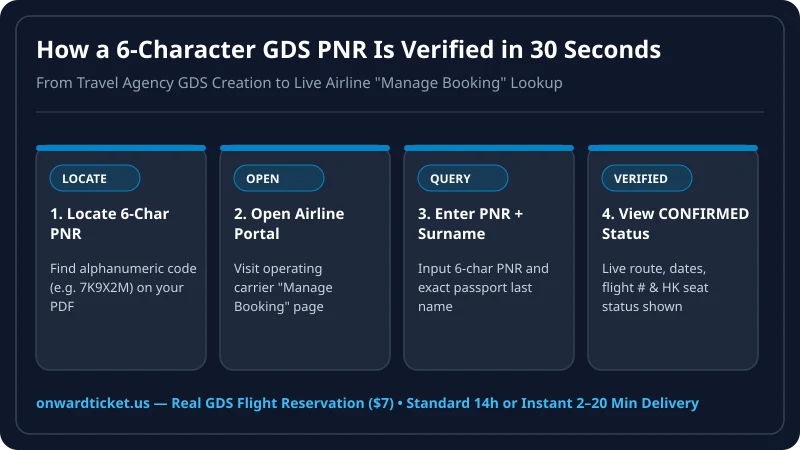
Step-by-Step: How to Verify Your Flight Reservation PNR in 30 Seconds
Step 1: Locate the Operating Airline and 6-Character PNR on Your PDF
Open your flight reservation PDF and look at the top header block. You will see:
- Booking Reference / Airline PNR: A 6-character code of letters and numbers (note: aviation PNRs often omit the letter
Oor use zero0/Odistinctly depending on the font—copy and paste directly from the PDF text to avoid typos!). - Operating Airline & Flight Number: Look at the 2-letter IATA airline code in front of the flight number (for example,
QRfor Qatar Airways,SQfor Singapore Airlines,MHfor Malaysia Airlines,KLfor KLM,LHfor Lufthansa,PRfor Philippine Airlines, orCMfor Copa Airlines).
Step 2: Go to the Operating Airline’s Official "Manage Booking" Page
Always verify your PNR on the official website of the airline operating the flight—not on a third-party search engine like Expedia or Skyscanner. On the airline’s homepage, click the tab labeled:
- "Manage Booking" (Singapore Airlines, Qatar Airways, British Airways, Emirates, Malaysia Airlines, KLM, Lufthansa)
- "My Trips" / "Find My Trip" (United Airlines, Delta, American Airlines, Copa Airlines)
- "Manage My Booking" (Philippine Airlines, Cathay Pacific, Thai Airways, Avianca)
Step 3: Enter Your 6-Character PNR and Exact Passport Last Name
Type or paste your 6-character Booking Reference into the first box and your Last Name (Surname) into the second box, then click Search / Retrieve Booking. Within two seconds, the airline’s website will load your itinerary page displaying:
- Status: Confirmed / Reserved
- Your exact departure and arrival airports, terminals, dates, and flight times
- Your passenger name and segment details
Important Warning: Once you view your live reservation on the airline’s Manage Booking page, never click "Cancel Booking" or "Modify Flights" on the airline’s website, as doing so will terminate your active PNR before you pass airport check-in or visa review!
Troubleshooting the 3 Most Common Airline PNR Lookup Quirks
Because airlines use legacy mainframes built in the 1980s and 1980s-era EDIFACT protocols to parse GDS records, first-time travelers occasionally run into one of three formatting quirks when typing their name into an airline website. Here is how to solve each one immediately:
| Airline Website Quirk | Why It Happens in Aviation GDS | Exact Fix to View Your Booking |
|---|---|---|
| 1. Title Attached to First Name (e.g., JOHNMR or SARAHMS) |
In EDIFACT GDS messages (SMITH/JOHNMR), the salutation (MR/MS) is appended without a space. Some airline forms require the First Name box to include MR or MS. |
If the airline asks for both First Name and Last Name, try entering FIRSTNAMEMR or FIRSTNAMEMS (matching how it appears on your PDF). |
| 2. Hyphenated or Multi-Word Surnames (e.g., DE LA CRUZ or GARCIA-LOPEZ) |
Aviation GDS name fields do not store hyphens or spaces inside surnames—they concatenate them into a single string. | Remove all spaces and hyphens when typing your last name into Manage Booking (e.g., type DELACRUZ or GARCIALOPEZ). |
| 3. GDS Locator vs. Airline Locator | When a reservation is created in Amadeus, Sabre, or Travelport for an airline using a different internal CRS, two 6-character codes exist: the GDS PNR and the Airline PNR. | Always use the Airline Booking Reference printed on your Onward Ticket PDF when checking directly on the operating carrier’s website. |
Understanding Aviation GDS Status Codes: HK, TK, UN & HX
When an airline check-in supervisor or consular officer looks up your PNR inside their terminal (or when you view the detailed segment breakdown on an airline website), they look at a two-letter IATA status code attached to each flight leg:
HK(Holds Confirmed): The gold-standard status code on a live GDS flight reservation. It confirms that a seat is actively held in the airline’s inventory under your name and PNR.TK(Timing Changed — Confirmed): Indicates the reservation is confirmed and active, with a minor airline schedule adjustment.HXorXX(Cancelled): Indicates the reservation hold has expired after its automated ticketing time limit (TTL) or was manually cancelled. That is why you should always time your Onward Ticket order within 24 to 48 hours before your flight departure so your PNR displaysHK(Confirmed) at the airport counter!
Quick Reference: How Major Global Airlines Label Their PNR Lookup Fields
Different airlines use slightly different terminology on their homepage for the exact same 6-character PNR lookup box:
- Qatar Airways, Singapore Airlines, Emirates & British Airways: Labeled "Booking Reference (6 characters)" plus "Last Name / Family Name" under the Manage Booking tab.
- United Airlines, Delta Air Lines, American Airlines & Copa Airlines: Labeled "Confirmation Number" or "Record Locator" plus "Last Name" under the My Trips / Find Your Trip tab.
- Lufthansa, SWISS, KLM, Air France & Turkish Airlines: Labeled "Booking Code" plus "First and Last Name" (remember to check whether
MRorMSis appended to your first name on the PDF if the form requests a first name). - Philippine Airlines, Malaysia Airlines, Thai Airways & Cathay Pacific: Labeled "Booking Reference" plus "Surname / Family Name" under Manage My Booking.
Where Is Live PNR Verification Most Common in 2026?
- Airport Check-In Counters: Flights into the Philippines, Thailand, Indonesia, Colombia, Costa Rica, and New Zealand routinely see counter supervisors verify 6-character PNRs before releasing boarding passes.
- Embassy & Consulate Visa Officers: Schengen VFS/TLS centers, UKVI, Japanese consulates, and Thai e-Visa officers check flight reservations during initial document screening.
Get a 100% Verifiable GDS Flight Reservation in Minutes
At Onward Ticket, every itinerary is created in a real, licensed travel agency Global Distribution System so you can verify your 6-character PNR directly on the airline’s website:
- Transparent Pricing: $7 for a One-Way reservation, $11 for a Return reservation, or from $18 ($9 per leg) for a Multi-City itinerary.
- Active PNR Validity: Remains live and verifiable for 48 hours to 7 days.
- Flexible Delivery Speed Tiers: Choose our Standard Delivery tier (within 14 hours) when ordering ahead of time, or our Instant Delivery tier (2–20 minutes) for urgent airport check-ins.
- Complete Visa Document Support: Preparing an embassy visa application? Combine your Flight Itinerary for Visa with a verifiable Proof of Accommodation and a professional Visa Cover Letter.
Frequently Asked Questions
1 What is a PNR code on a flight reservation?
A PNR (Passenger Name Record) is a unique 6-character alphanumeric code (for example, 7K9X2M or L4P8QW) generated by a Global Distribution System (such as Amadeus, Sabre, or Travelport) or an airline’s internal reservation system when a seat reservation is created.
2 How do I verify my onward flight PNR on an airline’s website?
Go to the operating airline’s official website, click "Manage Booking" or "My Trips," and enter your 6-character PNR code alongside your passport last name (surname). The airline portal will display your live reservation status ("Confirmed"), flight number, departure/arrival times, and passenger details.
3 Why does my surname sometimes include "MR" or "MS" when looking up a GDS PNR?
Some Asian and Middle Eastern airline websites parse GDS name fields by concatenating the title with the first name or surname without spaces. If entering your last name alone doesn’t match immediately, try entering FirstnameMR or check the exact passenger name formatting printed on your itinerary PDF.
4 What is the difference between a GDS PNR and an airline PNR?
When a travel agency creates a booking through Amadeus, Sabre, or Travelport (Galileo), the GDS assigns a 6-character locator, and the operating airline sometimes assigns a second 6-character airline-specific locator. Onward Ticket PDFs provide the verifiable locator you need for the operating airline.
5 How long does an Onward Ticket PNR remain active and verifiable online?
Our GDS flight reservations remain active and verifiable on the airline’s Manage Booking page for 48 hours to 7 days depending on the carrier’s automated ticketing time limit (TTL)—giving you full coverage through check-in and immigration.
6 Why do free fake ticket generators fail airline PNR verification?
Free PDF generators simply paste random letters onto a static HTML template without ever communicating with an airline or GDS. If a check-in supervisor or embassy officer types that fake code into the airline’s website, it returns "Booking Not Found," resulting in denied boarding or visa refusal.
Writer, onward travel basics
Nadia writes OnwardTicket’s guides to how proof of onward travel works: what airlines and immigration officers ask to see, how a flight reservation differs from a paid ticket, which visa types need one, and how to tell a genuine reservation service from a scam.
49 articles published