Key Takeaways
- When online check-in fails or withholds your mobile QR boarding pass on a one-way international flight, it is almost never a technical glitch—it is an automated IATA Timatic document inhibit flag.
- Airline Departure Control Systems (Amadeus Altea, Sabre Sonic, Navitaire, SHARES) automatically block mobile boarding passes whenever a tourist’s PNR lacks a return segment for a country requiring proof of exit.
- Receiving a "Check-In Confirmation Slip — Not a Boarding Pass" means your seat is reserved, but a counter agent must visually inspect your passport and onward flight reservation.
- Carrying a verifiable GDS onward flight reservation ($7 one-way, $11 return, valid 48 hours to 7 days, delivered within 14 hours Standard or 2–20 minutes Instant) lets the counter agent clear the flag in under two minutes.
You open your airline’s mobile app 24 hours before your flight, type in your passport details, pick your window seat, and tap Generate Boarding Pass—only to be greeted by an error banner: "Online Check-In Cannot Be Completed — Please Proceed to the Airport Check-In Counter for Document Verification."
If you are traveling with carry-on luggage only on a one-way international ticket, this message can feel baffling. Why did the app let you check in on a round-trip flight last year, yet block your digital boarding pass today? The answer is not a software bug.
Behind the scenes, your booking has triggered an automated immigration compliance check inside IATA Timatic and your airline’s Departure Control System (DCS). In this 2026 guide, we pull back the curtain on why online check-in fails on one-way international flights and show you how to breeze through the airport document verification desk.
What Is IATA Timatic (And Why Every Airline Obeys It)
IATA Timatic (Travel Information Manual Automatic) is the aviation industry’s central regulatory database, maintained by the International Air Transport Association (IATA) in Geneva. Every day, Timatic processes tens of millions of passenger queries for airlines, ground handling companies (such as Swissport, dnata, Menzies, and SATS), and reservation platforms worldwide.
When you check in for an international flight, the airline does not rely on a check-in agent’s personal memory of 195 countries’ immigration laws. Instead, its Departure Control System sends an automated XML query to Timatic containing five variables:
- Passport Nationality & Issuing Country (from your passport’s Machine Readable Zone)
- Passport Expiration Date (checking the 6-month or 3-month validity rule)
- Embarkation & Transit Airports
- Destination Country
- Ticket Type inside the PNR (Round-Trip/Onward Segment vs. One-Way Segment)
For most popular travel destinations—including Thailand, the Philippines, Indonesia, Japan, New Zealand, Costa Rica, Colombia, and the United Kingdom—Timatic’s entry section contains a mandatory warning clause:
"Warning: Visitors not holding return/onward tickets could be refused entry."
Because airlines face hefty government fines ($1,000 to $5,000 USD per passenger) and mandatory return-transport costs whenever an immigration officer refuses entry to an undocumented traveler, airlines treat that Timatic "Warning" as an absolute boarding prerequisite. For a quick summary of this policy, see our answer on how airlines enforce onward tickets and our pillar guide on whether onward tickets are checked.
Why the App Can’t "See" Your Separate Onward Flight
When you book a round-trip ticket on a single airline (say, London to Bangkok and back on Thai Airways under one 6-character PNR), the airline’s Departure Control System—such as Amadeus Altea, Sabre Sonic, Navitaire NewSkies, or SHARES—automatically sees Segment 2 (your return flight) inside the same record locator. Timatic’s onward-ticket requirement is satisfied automatically, and your mobile QR boarding pass is issued in seconds.
However, when you book a one-way flight—even if you already bought a separate outbound flight on another airline next month—your first airline’s computer can only see its own PNR.
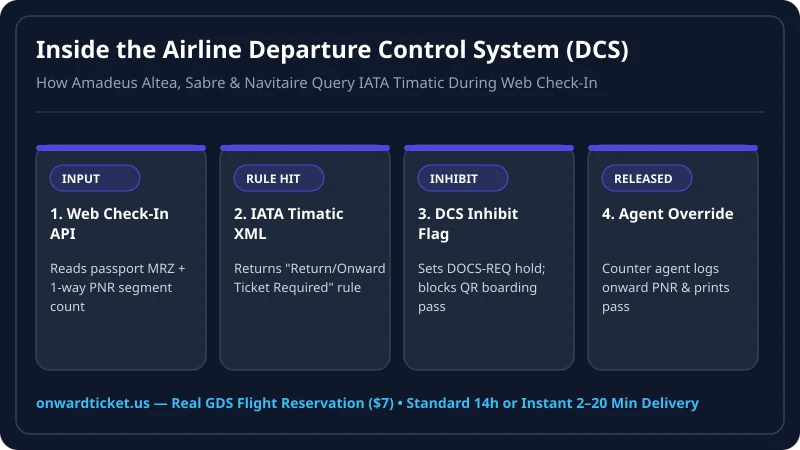
It has no way of knowing whether you hold a return ticket on another carrier, a long-term work permit, or nothing at all. Consequently, the DCS places an automated Boarding Pass Inhibit Flag (often coded as BP-INHIBIT: DOCS/ONWARD or ADC — Advisable Document Check) on your check-in record.
How the 4 Major Airline Departure Control Systems Handle One-Way Flights
Depending on which airline you are flying, your online check-in experience is governed by one of four underlying software platforms:
- Amadeus Altea DCS (British Airways, Lufthansa, Singapore Airlines, Cathay Pacific, Avianca, Qantas, Thai Airways): Connects directly to Amadeus Timatic AutoCheck. If Segment 2 is missing on a visa-free tourist itinerary, Altea either prompts you to type in an onward ticket number online or issues a "Confirmation Slip" requiring a physical passport swipe and onward PNR check at the airport desk.
- Navitaire NewSkies (AirAsia, Cebu Pacific, Scoot, Ryanair, Wizz Air, Jetstar): Designed for point-to-point low-cost carriers. Because Navitaire does not store interline tickets from other airlines, it places a mandatory document-check hold on almost 100% of one-way international bookings into Asia-Pacific.
- Sabre Sonic DCS (American Airlines, LATAM, AeroMexico, Philippine Airlines, Etihad): Uses Sabre Timatic integration. On one-way flights to Latin America or Asia, Sabre blocks kiosk boarding pass printing until an agent enters the
DOCS/ONWARDoverride code at the counter. - SHARES / TravelReady (United Airlines, Copa Airlines): United’s Travel-Ready Center and Copa’s web check-in portal allow some travelers to upload travel documents ahead of time, but still require counter verification whenever an onward flight is booked on a separate carrier PNR.
Decoding Common Airline App Messages on One-Way Flights
| Airline App / Kiosk Message | Airlines That Use It | What It Actually Means |
|---|---|---|
| "Check-In Confirmed — Not a Boarding Pass. Proceed to Document Check Counter." | AirAsia, Scoot, Cebu Pacific, Ryanair, Wizz Air | Your seat is assigned, but the QR barcode is suppressed until an agent verifies your onward ticket and visa/arrival card. |
| "Online Check-In Unavailable — Airport Check-In Required" | Copa Airlines, Avianca, LATAM, Jetstar, Philippine Airlines | Timatic requires manual agent entry of your onward flight PNR and passport validity before check-in can finalize. |
| "Verification Required at Gate / Service Desk (DOCS)" | United, American, Delta, British Airways, Lufthansa, Qatar Airways | Either your destination requires an onward ticket check or your e-Visa/ETA/ESTA status requires visual confirmation. |
What If the App Asks for Your Return Flight Details During Web Check-In?
A growing number of carriers (including United Airlines, Cathay Pacific, Singapore Airlines, and Qantas) now display a pop-up form during online check-in asking: "Do you hold a return or onward ticket departing [Destination]?" followed by input boxes for:
- Onward Airline Code & Flight Number
- Departure Date from Destination Country
- 6-Character Booking Reference (PNR) or e-Ticket Number
If you already have a verifiable GDS flight reservation from Onward Ticket in hand when online check-in opens 24 to 48 hours before departure, you can type those exact details into the airline’s web check-in form—and in many cases, unlock your mobile boarding pass immediately! Even when the airline still requires a quick 30-second visual glance at the airport desk, having your PDF ready ensures zero delay.
What the Check-In Agent Actually Types Into the Terminal to Release Your Boarding Pass
When you walk up to the airport document verification desk with your passport and your Onward Ticket PDF, the process takes less than 60 seconds because the agent is simply completing a structured three-step override inside their Departure Control System:
- Passport Swipe & Timatic Prompt: Swiping your passport through the keyboard reader brings up the exact Timatic warning line that blocked your mobile check-in (e.g.,
RETURN/ONWARD TICKET REQUIRED FOR VISA-EXEMPT ENTRY). - Inspecting & Logging Your Onward PNR: The agent looks at your PDF reservation to confirm your full name matches your passport, the departure city is inside the destination country, the flight date falls within the maximum visa-free stay, and the 6-character GDS PNR is active. Many airlines require the agent to type a free-text remark into your booking history—such as
ONWARD VERIFIED: SQ915 MNL-SIN 18NOV PNR ABC123—alongside their staff sign-in code. - Clearing the DOCS-OK Flag: Once the remark is saved, the agent toggles the passenger status from
DOCS-REQtoDOCS-OK, and the thermal printer immediately prints your boarding pass withDOCS OKstamped in the corner.
How to Clear the Airport Document Verification Desk in Under 2 Minutes
Because an online check-in block means you must visit the physical check-in desk before the 60-minute international check-in cutoff, follow this streamlined checklist:
- Order Your Onward Reservation Before Check-In Opens: Visit Onward Ticket 24 to 36 hours before your flight. A One-Way reservation is $7, a Return reservation is $11, and a Multi-City itinerary starts from $18 ($9 per leg).
- Pick the Right Delivery Speed Tier: Select our Standard Delivery tier (within 14 hours) when ordering the day before departure, or our Instant Delivery tier (2–20 minutes) if you only discovered the online check-in block on your way to the airport.
- Verify Your Stay Window: Make sure your onward flight departs within the destination country’s visa-free limit (e.g., 30 days for the Philippines and Indonesia, 60 days for Thailand, 90 days for Colombia and Japan). Every reservation remains active and verifiable on the airline’s website for 48 hours to 7 days.
- Complete Digital Arrival Cards & Accommodation Proof: Fill out your destination’s digital arrival card (such as Philippines eTravel, Thailand TDAC, or Singapore SGAC) using the flight number on your onward PDF. If you also need a matching hotel voucher for immigration or visa filings, check out our Proof of Accommodation, Visa Flight Itinerary, and Visa Cover Letter services.
Frequently Asked Questions
1 Why does online check-in fail when I book a one-way international flight?
When you check in online for a one-way international flight, the airline’s Departure Control System (Amadeus Altea, Sabre Sonic, Navitaire, or SHARES) queries IATA Timatic. If your destination requires proof of onward travel for tourists and no return segment exists in your PNR, the system sets a DOCS inhibit flag and requires an airport agent to verify your exit ticket.
2 Does "Check-In Confirmed — Collect Boarding Pass at Counter" mean my seat is lost?
No. When an airline app issues a "Confirmation Slip" or "Not a Boarding Pass" notice after online check-in, your seat assignment is locked in. You simply need to stop by the document verification desk before bag-drop cutoff so an agent can inspect your passport and onward flight reservation.
3 What is IATA Timatic and how do airlines use it?
IATA Timatic (Travel Information Manual Automatic) is the global database used by almost every airline and ground handler to verify passport validity, visa rules, digital arrival cards, and return/onward ticket requirements for every nationality and destination pair.
4 Why did my travel companion get a mobile boarding pass while mine was blocked?
Timatic rules depend on your exact passport nationality, residency status, and ticket structure. If your companion holds a passport with different visa-free privileges, a local residency permit, or a return leg on the same airline PNR, their boarding pass may clear while yours requires manual onward-ticket verification.
5 How do I clear the airport document verification check quickly?
Arrive at the airport with your passport, your completed destination digital arrival card, and a verifiable onward flight reservation showing a 6-character PNR departing within your allowed stay. The agent enters the onward flight number into their terminal and prints your boarding pass in under two minutes.
6 How long before my flight should I order an onward flight reservation?
Order 24 to 48 hours before departure using Standard Delivery (completed within 14 hours) so your reservation is active for 48 hours to 7 days across your entire trip. If you are already at the airport, use our Instant Delivery tier (2–20 minutes).
Writer, onward travel basics
Nadia writes OnwardTicket’s guides to how proof of onward travel works: what airlines and immigration officers ask to see, how a flight reservation differs from a paid ticket, which visa types need one, and how to tell a genuine reservation service from a scam.
49 articles published